How to Use Two Whatsapp in one phone (No Root Required)


Do you use dual sim mobile and always wonder if you could use two Whatsapp in one phone, or even two Telegram, or Instagram or any other app, then this is for you.

Since Whatsapp was launched,  it has almost replaced your default messaging app because it’s convenient, you can send text, image, video without having to worry additional carrier charges. But if you are using dual sim android mobile (Most of android phone now days are having dual sim capabilities). You may find it annoying to carry two different phones in order to be able to use two Whatsapp, to manage your business and personal communication or may be your more than one girlfriend or boyfriend 😈 .

Security advice //**DON’T EVER DOWNLOAD ANY MODDED APK FROM ANY UNTRUSTED SOURCE, IT CAN SERIOUSLY TAKE OVER YOUR PHONE WITHOUT YOU KNOWING**//

Well, as all of us know, android is highly customizable and with little coding skill we can enable dual OS booting in android, it means you can run two operating system in your phone, but it will require moderate coding skills in order to not to brick your phone.

Are you thinking to quit after reading aforesaid, well you need not to.

Here is a simple app which can run virtual dual OS for you without any root and you can easily run two Whatsapp in one phone.

This app is called ‘Parallel Space‘. It can act as a virtual OS for you ,and whatever app inside this app are different from your own main installation, it means you can run two Whatsapp in one phone, can play any game twice, can store your personal data in virtual OS, it also increases your privacy. Here are the steps you need to do to get parallel space on your android to run two Telegrams or Whatsapp in one phone.
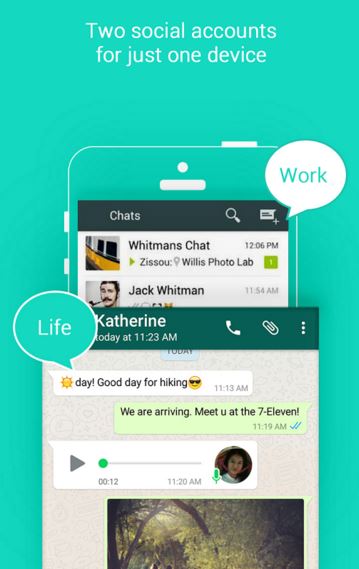
Multiple Whatsapp on one phoneDownload it from google play link here

Once installed run it and grant all permission it asks for (t’s required for app to run smoothly)

Open the app and press on + button, it will open list of recommended app and already installed app on your device. Make sure you have Whatsapp installed on you phone.

After you select the Whatsapp, parallel space will begin the installation process and you will be required to verify your number for Whatsapp, just enter your second number which you are not using currently and it will get verified.

You can test if two Whatsapp is running in your phone, by sending message from one number to another.

Share it with your friends, and don’t forget to like our facebook page for more cool info.

*Editor’s Note: This article has been written by our dear friend whose first (or even the second) language is not English, so please excuse the grammar.


Make An Electricity Free Air Cooler – Its Simple & Green

2


You may have seen many air coolers that use a simple electric fan and cold water or ice to make an air conditioner. Those are cheap to make, but maintaining/running them is a hassle. Instead, why not make an A/C that doesn’t use any ice or electric fan to provide you with cool air. Sure, if you want, you can modify it to make use of ice and fans and make it even better. Is it magic? Kind of… it’s actually some cool science! [enough of the puns already 😉 ].*(Actually sorry for that! See end of the article!)

Try blowing air on your hand with a wide mouth, then try it with pursed lips. Notice any difference? This is the principle we’ll be using for our cooler. This eco-cooler that we are about to make will work better in a windy place. Unfortunately, if there is no wind then you’ll have to rely on other methods.

You can also download a PDF (links below) and watch a video (after the steps).

eco cooler step 1Step 1

Gather as many used soft-drink and water bottles. The bigger the size difference between the body and the rim of the bottle, the better. 1.5L and 2.0L bottles are ideal.


Step 2

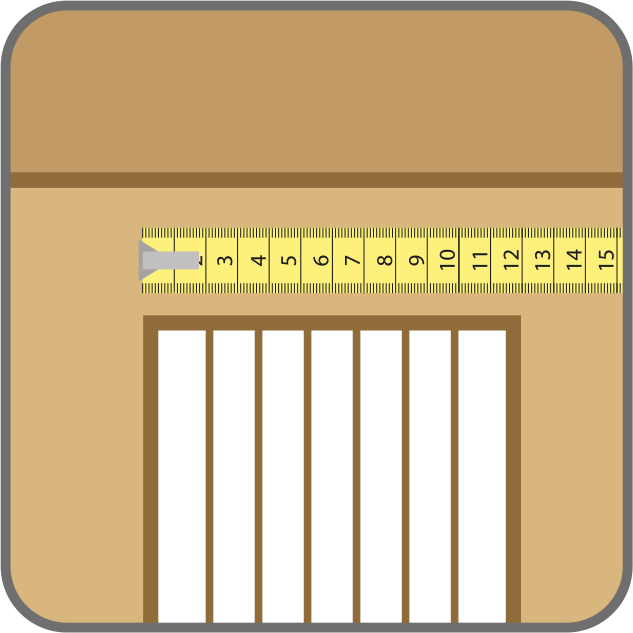
zero cost aircooler 2Measure the window you want to make the Eco-Cooler for. And cut a sturdy 2mm medium density board or similar sturdy board in the same size.

Make sure to keep atleast half an inch flushed around all the sides. This will ensure you have the perfect sized Eco-Cooler.

ecocooler 3Step 3

Cut holes in the board according to the measurement of the rim of the bottle. Make sure the cuts are spaced out according to the body size of the bottles.


step 3 - eco cooler

no electric aircooler 4Step 4

Using a pair of scissors, cut the bottle in half – along the body of the bottle.

zero cost a/cStep 5

Cut away the top of the bottle cap. This will help fix the bottle into the board.


zero cost eco coolerStep 6

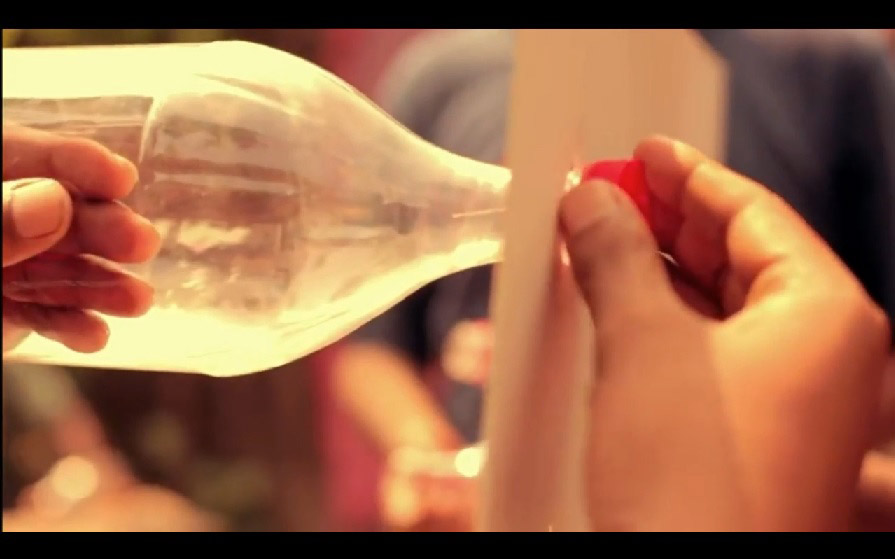
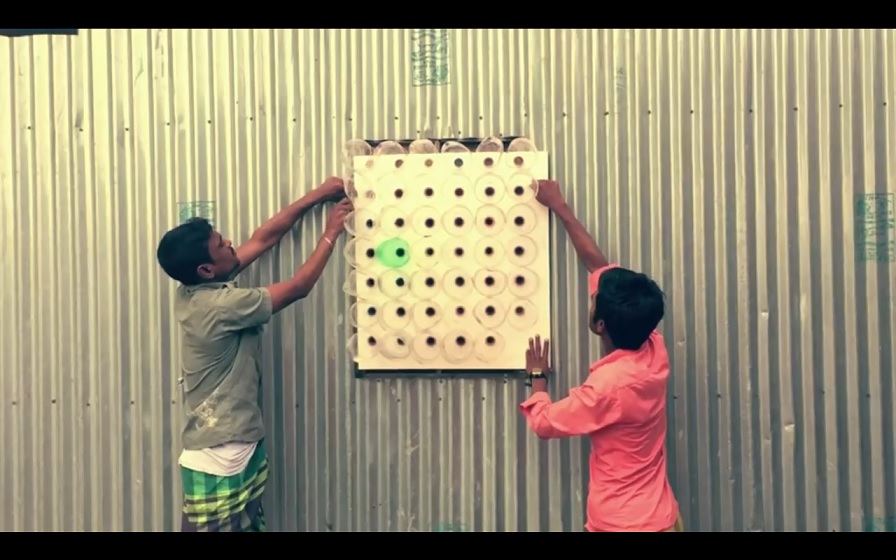
Pushing the cut bottle from the outer side of the board, twist the cap from the inner side and tighten it, to keep the bottle in its place. Repeat for the remaining bottles and fix the Eco-Cooler from the outer side of the window.

step6 - ecocooler
Step 6
ac2
Repeat 🙂

ac3 ac4


You can also download the PDF instructions (which includes a scale drawing for 2L bottles) from link 1 or link 2.

Watch the video below of how its helping small communities and villages in Bangladesh, but before that, do you know why it works? Its simple science actually

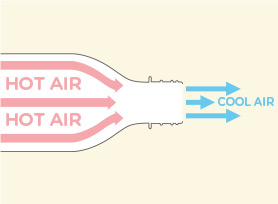
How it works?The neck of plastic bottles, helps to compress the air. As the hot air is pushed towards the rim (just as it exits the bottle), it starts expanding. This rapid expansion of the warm air cools the air down. It has been noted that depending on the conditions, this air can be up to 5ºC cooler. For more on the science, check out this link.


*Explaination: Actually we did see a reduction in temperatures, but the reasons in this method and article are not why it happened. This device is almost useless and the science doesn’t add up. The only reason we noticed a reduction in daytime temperature was probably due to the reduced sunlight that entered the room (because of the holes, the wind wasn’t completely blocked). Yes, air does absorb heat when it expands immediately but in this device, the both the process are happening, compression and expansion. The heat has nowhere to go, then the temperature is uneffected due to this. 😐 Sorry for getting your hopes so high! We regret that we wanted this so be so true that we also believed in it for a while. Thanks to some of your comments on reddit and YouTube, we were able to rectify our mistake!

ISPs Trump Google with Super Fast Broadband


While Google has been working hard to connect a variety of communities throughout the nation with super high speed Google Fiber, it is being trumped by competitors like AT&T and Comcast who are now offering 1 gigabit Internet service to users in different. And it’s fast becoming the norm.

The State of Gigabit Internet

Google came forward 6 years ago and announced its intention to bring 1 gigabit/fiber Internet to communities throughout the United States of America. However, it is truly working on its own schedule. Whether that is by design or not, it has opened the door for many other companies to get a jump on being the first to offer  1 Gig Internet speeds in markets that Google is planning to enter and others that Google has not even planned for yet.

  • There are currently 4 markets with Google Fiber, and is currently laying fiber in San Antonio, Texas.
  • In 2015 and 2016, there were announcements of 7 other markets where Google Fiber would expand: Nashville, Charlotte, Raleigh/Durham, Atlanta, Southern California, Salt Lake City, and Huntsville. Construction has yet to begin on those.
  • Amongst the companies offering Gigabit Internet are Verizon FiOS, CenturyLink, AT&T, Cincinnati Bell, Comcast, and Frontier.
  • Companies are jumping the gun on Google and introducing faster speeds, including 1 Gigabit Internet, in the markets Google has targeted and beyond.
  • By being the first to offer the higher speeds, these competitors know they have the advantage, over any provider that comes later.
  • AT&T has up to 1 million users of Gigabit Internet, while Google has fewer than 100,000.
  • In addition, AT&T has plans to expand into 36 more cities and is currently the leader in gigabit service.
  • Comcast currently offers gigabit Internet in Atlanta, and is expanding to Chicago, Detroit, Miami and Nashville this year.
  • It has been noted that Google and some of the other fiber Internet providers have largely focused their development on wealthy communities. CenturyLink is attempting to bring Gigabit service to underserved areas of the country.

google fiber

Bundle Deals and Other Attempts at Competing

The competition is easily trumping Google’s pricing, with deals like Comcast’s Internet/TV bundle package for $80 compared to Google fiber pricing of $70 per month. However, in March of this year, Google introduced its own bundle services with TV and phone service to try and compete.

Google is also investigating other options to help make them more competitive in a marketplace that is adapting quickly. It is testing out the option of wireless technology or using existing utilities’ fiber networks instead of starting from scratch with its own.

The reality is that the increase in competition from Google and other providers of Gigabit Internet is helping the industry overall. Municipalities are becoming more compliant with providers looking to bring the higher speed options to their communities. They are listening to what customers want and helping to pave the way for future development of Gigabit networks in their cities. All this spells good news for ISPs and consumers.

TeslaCrypt Ransomware Creators Giveup The Master Key


Many of you are already aware of what a ‘ransomware’ is. For those who don’t know, a ransomware is a type of a virus or malware that takes over a computer or a laptop and encrypts all its files and data, making them inaccessible (aka make them hostage). Even if the ‘virus’ is removed, the files still remain inaccessible because they have been encrypted by a sophisticated algorithm, which can be very costly, if at all possible, to decrypt without the creators help. A ransom is then demanded from the victim and if paid, the malware operators ‘may’ decrypt the files (in some instances, they just demand more money and never provide a decryption key).

TeslaCrypt is one such ransomware, which is famous because it is good, effective, widespread, and was uncrackable until now, thanks to its original creators. In a surprising move, the makers of TeslaCrypt simply gave away the master key to a security researcher from ESET when he requested, and shut down their operations.

Over the previous few weeks, an analyst for ESET had observed that the builders of TeslaCrypt had been slowly closing their operation, whereas some of their distributors were switching over to distributing (aka infection via) the CryptXXX ransomware.

When the ESET researcher realized what was taking place, on the help chat for the malware (Yes, they have/had one. Its usually a .onion address, which means you need ToR to access it. They do need to collect payments after all), he request them to share the master decryption key and to his shock and amazement, they agreed and posted it on their now defunct web site.

remove TeslaCrypt Ransomware
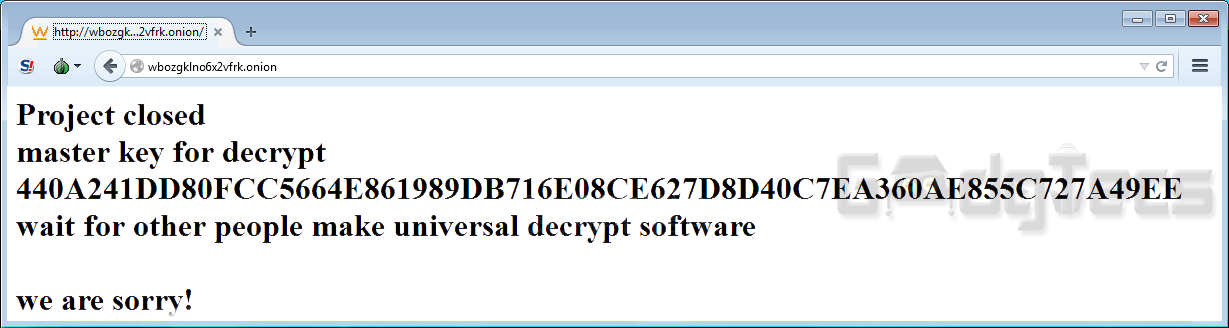
The now defunct .onion site of the ransomeware displaying the ‘key’ with an apology!

The security company, ESET, has subsequently been able to produce a decryption software that will allow anybody who was affected to get their data back. Anyone who has TeslasCrypt encrypted files with the .ttt, .mp3, .xxx, .micro, or encrypted files without an extension can now decrypt their files for free! (click here to download ESET’s decryption utility) 

Ransomware still continues to be one of the largest threats to users’ files and data online, according to ESET. It advises that everyone should keep their operating systems up to date and use a good antivirus, as well as making multiple regular backups of anything valuable and important. There are still many malwares that plague the internet.

Five Mac OS X Tips And Tricks You Must Know

0

Sometimes, only use a mouse or trackpad is not fast enough to doing your work, especially it’s nearing to the deadline. Sometimes, you might want to switch between Mac fullscreen windows faster, but don’t know how to do it.

There are ways to do much more with your Mac computer, especially things you didn’t even think it’s possible. Here are five simple tips and tricks, which will help you master your Mac OS X computer with a few shortcuts.

Split Screen

This feature is only available from Mac El Capitan and of course, any new updates in the future. It allows you to split your current screen into two windows.

It’s so great to do something else, but still keep an eye on a YouTube video, right?

In order to combine two active different windows into both sides of your current screen, simply click and hold the green expand button at the top left of the window until the window retract, and a half of your Mac screen is highlighted blue.

With your finger and touchpad, you can drag a window to left side or right side as you would like.

In the next step, choose another window to fill up a half left of your screen. You are now successfully split your Mac screen into two windows.

If you don’t want to use your screen in the split mode anymore, just click the green expand button on any window again, and that window will go back to normal size. The other window will expand to fullscreen mode.

Switching Among Mac Windows

When you open too many applications on your Mac, switching among of them is a bit difficult. You may have tried to minimize one by one to find the right window you want to use.

From now on, you don’t need to follow that way anymore. There is a shortcut to help you switch among the application’s windows and bring up the one you want. All you need to do is just press and hold “Command” key, and then press the “Tab” key multiple times until you found the window or application you want.

Mastering Browser Tabs

Keeping both of your hands on the keyboard is hard to navigate your browser tabs. But you can easily use these tips to replace your mouse – it’s even faster.

If you want to open a new browser tab, just press Command + T, or Command + W to close your current tab. To re-open a tab that you have closed in an accident, simply press Command + Shift + T.

Switching between browser tabs can be a bit of annoying, especially if you opened a lot of tabs. To help you change your current tab faster, simply press Command + Shift + “{” (the left bracket), or Command + Shift + “}” to cycle to the left or the right.

Use Spotlight To Search Anything You Want

mac-spotlight

You might be familiar with using Finder to find an application, folder or a file. But it can be a little of pain to click around when your Mac computer is full of applications, folders, and files.

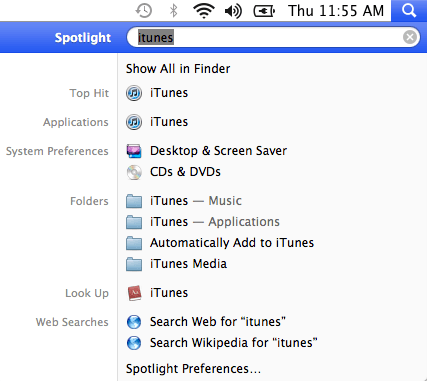
In case you can remember exact what you are looking for, simply press Command + Space to bring up Spotlight and then search for anything you want. Just type its name!

Easy To Take Screenshots On Your Mac

If you are recently switching from Windows to Mac OS X platform, you might not know how to take a screenshot of your Mac. In fact, it’s very simple to print screen on a Mac, and there are two ways to do that.

The first method is using a combination among of Command + Shift + 3. It will take a screenshot of your entire Mac screen and save it as a PNG picture on your desktop.

Meanwhile, the secondary method is using a combination among of Command + Shift + 4, which will allow you to select a particular area to take a screenshot and save file after you selected.

You can also take a screenshot of a specific application by pressing the “Space” key after “Command + Shift + 4”. Your cursor will automatically be turned into a camera icon. Just move this camera icon to the application you want to take a screenshot and click the left button of your mouse.

Have something to share with us? Leave your comment below.

Tesla Losing The Driverless Electric Car Race To Chinese Firms

1

The LeSEE, introduced recently in China by LeEco, managed to drive itself out of a shipping container and on to the stage with just a few voice instructions spoken right into a smartphone by the firm’s CEO Jia Yueting.

LeSEE driverless electric car
Source: LeEco

To be fair, Tesla can also be summoned through a smartphone, however not utilizing voice instructions, yet. But it is a big leap for LeEco, a firm that has previously produced smartphones and has zero pedigree in the automative arena.

LeEco also recently announced its funding in a three way partnership between Aston Martin and Faraday Future, a direct competitor of Tesla, further signalling its intentions in the area.

The front of the car features an LED loop that can be lit in different spots such as indicators or fog lights. The rear passenger doors, generally known as ‘suicide doors’ open from a hinge at the rear, versus the front.

Check out all the pictures of the LeSEE below:

[rev_slider alias=”china lesee”]

Inside, there are LCD screens all over the place right now – which suggests this is just a proof-of-concept for now.

However what this automobile represents is a change in the wind in terms of who the world’s largest automotive producers could be in future. Currenty, Toyota, Volkswagen and GM dominate the trade, collectively selling 30 million cars a year. However these numbers are going down.

The Chinese government meanwhile has been throwing incentives at indigenous companies to lead the cost when it comes to battery technology and electrical-powered vehicles.

They have also waived a previous law that protected home-grown firms from being gutted by foreign competition, as long as they put money into electrical technology.

That’s led to a growth in EV startups such as NextEV and CH-Auto who, together with LeEco, might turn the automobile business on its head. Especially given the scale of China’s domestic market has now surged past America’s to turn into the largest economy in the world.

Chinese EV corporations have also been poaching talent from the likes of BMW to help make China the electric car center of the world.

The first LeSEE electric car made its proper debut at the Beijing Auto Show on April 24, alongside a host of others.

Watch out Tesla. There is a new kid on the block.

Huawei’s P9 – An Amazing Smartphone With An Even More Amazing Camera

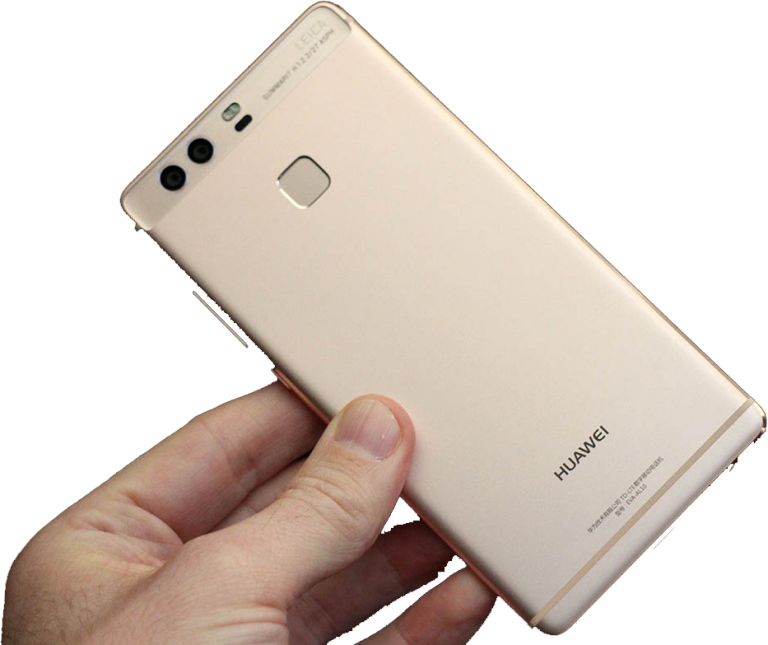
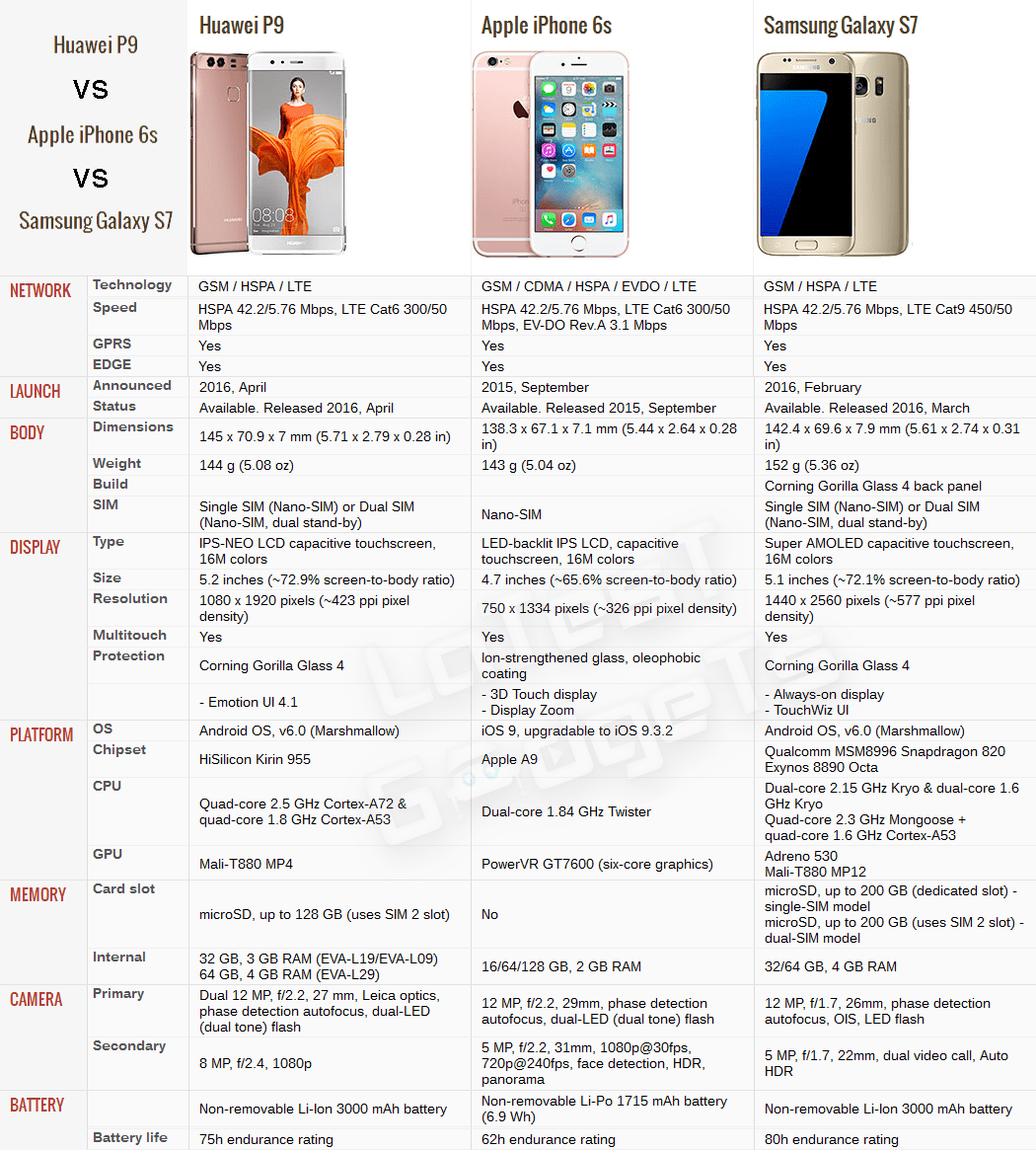
Huawei is trying its best to increase its share of the market in the world of smartphones. In order to beat the likes of Samsung and Apple, it is pursuing an aggressive strategy and in doing so, is making some excellent phones. After the slightly positive response for P8, the Chinese smartphone maker’s latest addition to their lineup is none other than Huawei P9. The flagship P9 is probably best seen as an excellent digital camera with a good smartphone attached.

For a complete review, head on over to LatestGadgets.Tech -> Review: Huawei P9 – Does It Meet Expectations or Beat Them?

Comparison of Main Features of Huwaei P9 vs Apple iPhone 6S vs Samsung Galaxy S7

huawei p9, apple iphone 6s, samsung galaxy s7
Source: LatestGadgets.Tech and gsmarena.com

Experimental DNA Data Storage: 1 billion terabytes in a gram

0

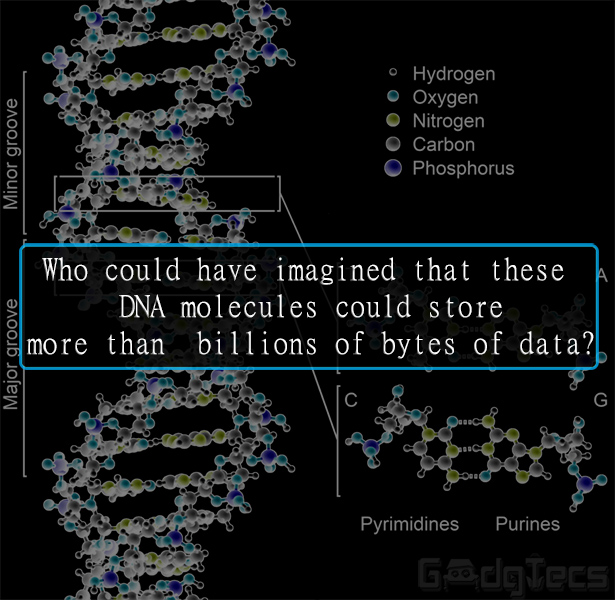
Ever ran out of disk space? In the future, you might not have to worry about that, especially when it comes to long-term storage. Microsoft has bought ten million strands of Deoxyribonucleic acid (DNA) from biology startup Twist Bioscience to research the usage of genetic material to store data.

The data density of DNA is orders of magnitude higher than typical storage techniques, with 1 gram of DNA capable of storing nearly 1 zettabyte, or 1 billion terabytes of data. In terms of volume, Microsoft Research estimates that one cubic millimeter of DNA can store up to 1 exabyte, or 1 billion gigabytes of data. To put it in perspective, according to Twist Bioscience’s CEO Emily Leproust “Using DNA, you can fit all the knowledge in the world inside the trunk of a car.” DNA can also be remarkably robust; DNA fragments thousands of years old have been successfully sequenced. However, this does not mean your next laptop will be using DNA for storage. It will take time for the technology to become commercially viable.

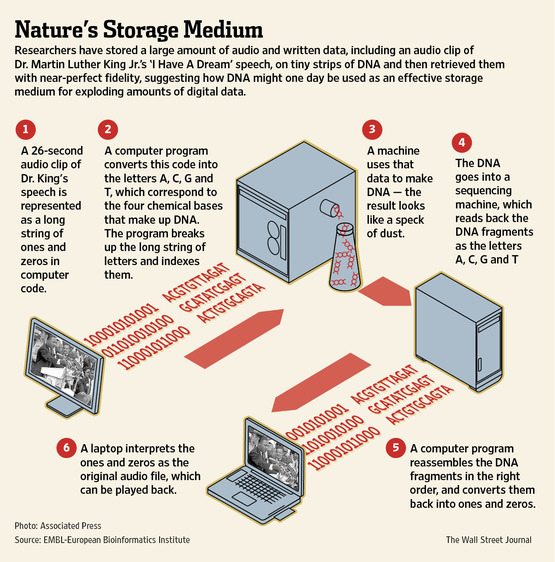
These properties make it an exciting possibility for long-term information archives. Binary data has already been successfully stored as DNA base pairs, with estimates in 2013 suggesting that it might be economically viable for storage of over five hundred years.

How is data stored in dna
Source: https://lis3353.wikispaces.com/DNA-Based+Storage

The big issue with DNA storage is reading and writing data. The writing is done by Twist; the company can produce custom strings of DNA utilizing a machine it constructed. The firm’s principal clients are research labs that insert customized genetic materials into microbes to produce organisms that may carry out useful chemical processes, such as producing desirable nutrients. Utilizing DNA for data storage is a brand new field for the firm. A customized DNA sequence costs about 10 cents per base, with Twist hoping to get that price tag all the way down to 2 cents.

Reading the data uses genetic sequencing, the costs of which have dropped substantially during the last 20 years. The human genome project, which ran from 1990 to 2003, cost about $2.7 billion dollars. The same process can now be done for about a $1,000.

These costs, though dropping, imply that commercial viability of artificial DNA storage is still way off, however the technology itself works. Microsoft says that its preliminary trials with Twist have proven that the method allowed complete retrieval of the encoded data from the DNA without any errors. In short, it works. If the costs of this technology can be bought sufficiently down, it means that in the future long-term data archiving may use similar technology as life itself.

8 Tips to Fight the Summer Productivity Slump – by Wrike

As temperatures rise, work productivity plummets, by 20%, to be precise. It’s no secret either: 25% of respondents to a recent survey admit they only work hard one day a week during summer. With the lure of beach barbecues and afternoon baseball games, how can you get your team to stop thinking about playing hooky and focus on work? Use the tips, brought to you by Wrike Project Management Software, to promote productivity and focus within your workplace.


8 Tips to Fight the Summer Productivity Slump - by Wrike project management softwareInfographic brought to you by Wrike, a free web based project management software

Increase the range of you car keys fob easily

0

This one sounds so preposterous, it’ll certainly strike you as nonsense — however, it actually works.

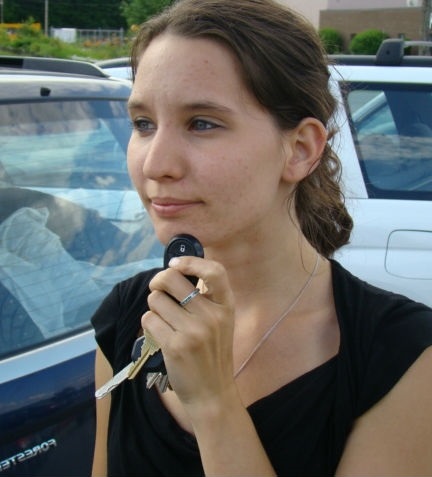
If you hold your automobile’s remote control against your head, you’ll be able to lock and unlock your car from much farther away than your remote usually allows. Depending on the automobile model and your body composition, chances are you’ll acquire as much as 30 meters of extra range (about the length of 6 cars).

When this tip is passed around on-line, folks often recommend holding the fob underneath your chin. However, you’ll most likely find that something fleshy, like your cheeks, works better than something bony, like your forehead

That’s as a result of behind the scenes — or, rather, inside the scenes — the fluids of your head act as a conductor. Your body turns into a part of the antenna — a much larger one, than the one inside the fob. For those who’re old enough to recollect when TV units had “rabbit ears” antennas, you might recall that you sometimes obtained the clearest image if you were touching the antenna. A similar principle applies here.

[affiliate_loophole src=’https://amzn.to/2KKBmUZ’]

For a demonstration, you can check this old YouTube video below

Extend your key fob’s wireless range. Now if only the same thing worked for extending the range of our laptops Wi-Fi or cellphone coverage…